Hi - Dave here.
Happy Friday!
A while back, I shared a solution for creating a mortgage payment schedule with Excel formulas. A mortgage payment schedule is a detailed breakdown of every payment over the life of a loan.
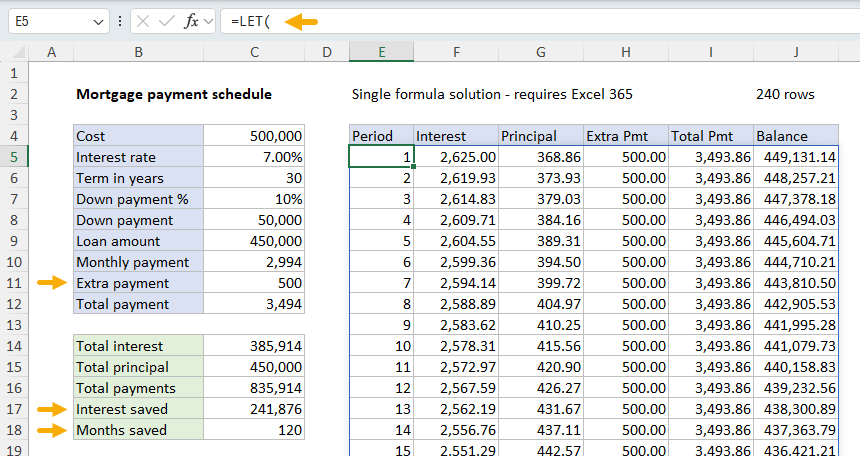
A few months ago, a reader asked me how to modify the schedule to handle extra payments. This is a non-trivial change, but I finally had some time to update the workbook. You can see what this looks like in the worksheet below, where the extra payment is now a variable in cell C11:
[
Download the workbook and read the full explanation]
When the extra payment is set to zero (or blank), you get a standard payment schedule with no early payoff. When set to a positive value, the number of required payments is reduced, and the worksheet calculates interest saved (C17) and months saved (C18).
As you can see, extra mortgage payments can make a huge difference on a long-term loan. In this example, an extra $500 per month reduces a 30-year loan to 20 years and saves over $241,000 in interest. The model makes it easy to explore different scenarios by changing the inputs in column C. Download the workbook and try it out yourself!
Note: The worksheet included two approaches: (1) a single formula approach and (2) a traditional formula approach. The single formula solution requires Excel 365 or Excel 2024+, and the traditional approach will work in any version of Excel.
Excel formulas
We maintain a list of over 1000 working formulas
here.
If you need more structure, we also offer
video training.
Have a great weekend!
Dave
The Exceljet newsletter is free and sent weekly on Fridays. Each week, I take a detailed look at a specific Excel formula or function. Sign up on our home page.