Hi - Dave here.
Happy Friday!
Have you ever built a formula where the same calculation appears more than once? A classic example is using IF to check a result, then repeating the same calculation again to return that result:
=IF(VLOOKUP(E5,data,2,0)="","",VLOOKUP(E5,data,2,0))
Here, the same VLOOKUP appears twice: once to check for an empty result, and again to return the value. This works, but the formula gets long, and each repetition is a chance for errors to creep in.
The LET function solves this problem by "letting" you name and define variables directly inside a formula. You define a value once, give it a name, then reuse it by name as many times as you like. With LET, we can rewrite the formula above like this:
=LET(x,VLOOKUP(E5,data,2,0),IF(x="","",x))
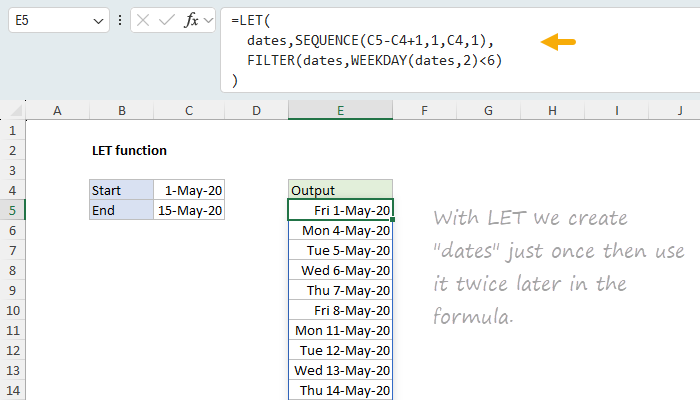
Notice we only use VLOOKUP once and store the result as "x". You can see a more advanced example in the worksheet below, which lists the working days between two dates:
[
Read the full article and download the workbook]
This formula uses SEQUENCE to generate all dates between a start and end date, then filters out weekends with FILTER and WEEKDAY. Notice we create "dates" just once, but we use it twice in the formula. Without LET, the formula would need to run the SEQUENCE step two times:
=FILTER(SEQUENCE(C5-C4+1,1,C4,1),WEEKDAY(SEQUENCE(C5-C4+1,1,C4,1),2)<6)
LET is a
major upgrade to Excel formulas because it allows you to apply the "DRY" principle from programming: Don't Repeat Yourself. I just updated our LET function page to include seven examples, plus rules for variable names and useful best practices. The page now includes a workbook with all examples so you can experiment yourself.
If you haven't tried LET yet, this page is a good place to start. If you're already using LET, did I miss anything important?
Note: The LET function requires Excel 2021 or later, or Excel 365.
Excel formulas
We maintain a list of over 1000 working formulas
here.
If you need more structure, we also offer
paid training.
Have a great weekend!
Dave
The Exceljet newsletter is free and sent weekly on Fridays. Each week, I take a detailed look at a specific Excel formula or function. Sign up on our home page.