Hi - Dave here.
Happy Friday!
In my last email, I talked about BYROW, a new function for "walking" rows and performing per-row calculations along the way.
This week, I want to introduce the BYCOL function, which does the same thing with columns.
BYCOL is useful when you want to answer "any", "all", or "none" questions about entire columns of data.
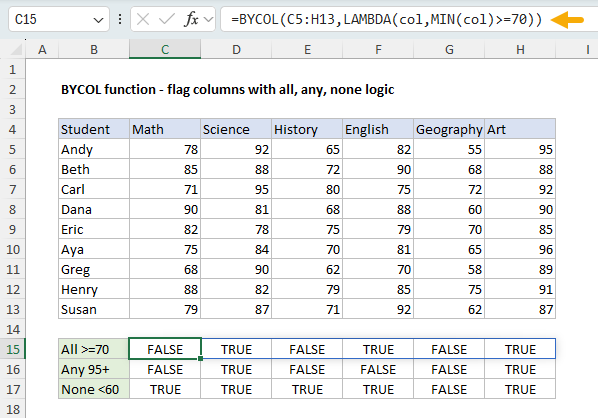
You can see an example in the worksheet below, where each student has 5 test scores, and BYCOL is used to answer 3 questions:
1. Were all scores at least 70?
2. Were any scores over 95?
3. Were no scores below 60?
The formula in C15 looks like this:
=BYCOL(C5:H13,LAMBDA(col,MIN(col)>=70))
[
Download the workbook and read the full explanation]
The biggest question people have with a function like BYCOL is why it exists and when to use it. I think the ideal use case is when you have a range of columns that is always expanding. By combining BYCOL with TRIMRANGE (or the dot operator), you can build a formula that automatically expands to fit the new data as it arrives. Read the article above for details, and download the workbook to follow along.
Note: BYROW is only available in Excel 365 and Excel 2024.
New functions in Excel
Excel has introduced many new functions in the last few years. For an overview, see
New Excel Functions.
Excel formulas
We maintain a list of over 1000 working formulas
here.
If you need more structure, we also offer
video training.
Have a great weekend!
Dave
The Exceljet newsletter is free and sent weekly on Fridays. Each week, I take a detailed look at a specific Excel formula or function. Sign up on our home page.