Hi - Dave here.
Happy Friday!
At first glance, SEQUENCE looks like one of the least exciting functions in Excel. All it does is generate a list of numbers. For example, this formula returns the numbers 1 to 10 in a column:
| =SEQUENCE(10) |
So SEQUENCE is boring and not that useful, right?
On the contrary! It turns out that SEQUENCE is one of the most useful functions in Excel, precisely because so many problems come down to a list of numbers. Row numbers are a list of numbers. So are dates, since Excel dates are just numbers. And inside more advanced formulas, SEQUENCE provides index numbers, character positions, sort keys, and more. In short, SEQUENCE plays a key role in modern Excel.
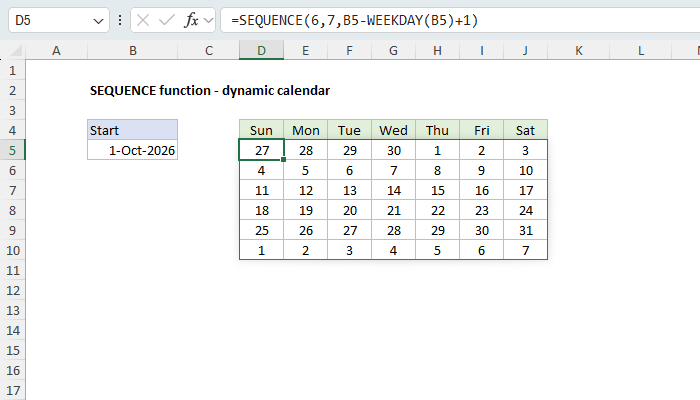
To give you an idea of what you can do with SEQUENCE, here is a complete monthly calendar from a single formula. With the first day of the month in cell B5, the formula in D5 is:
| =SEQUENCE(6,7,B5-WEEKDAY(B5)+1) |
Download the workbook and read the full explanation
SEQUENCE returns 42 dates in 6 rows and 7 columns. The only trick is the start date: B5-WEEKDAY(B5)+1 steps back to the Sunday on or before the first of the month, so that each week starts on Sunday. A number format of "d" displays just the day number. Change the date in B5, and the calendar rebuilds automatically.
I recently rewrote our SEQUENCE page with 14 worked examples, from simple to advanced: numbering rows, listing all dates in a month, monthly and quarterly dates, workdays that skip holidays, letters A to Z, summing the top n values, splitting and reversing text, random numbers without duplicates, pulling every nth row, and more.
One of my favorites is a formula for automatic row numbers:
| =SEQUENCE(ROWS(C5:.C1000)) |
The dot after the colon makes this a trim reference, which tells Excel to ignore empty rows at the end of the range. Add a value to the list, and a new row number appears. Remove a value, and the row number disappears.
Note: SEQUENCE requires Excel 2021 or later. Trim references like C5:.C1000 require Excel 365.
Keeping Exceljet going
The internet as we know it is getting crushed by AI. Many websites have lost over half their traffic. Exceljet is still at it, publishing new content each week. If you find Exceljet helpful, you can support the site and go ad-free with the Exceljet Lifetime Pass. One payment, no subscription, and ads are gone forever.
Excel formulas
We maintain a list of over 1000 working formulas here.
If you need more structure, we also offer video training.
Have a great weekend!
Dave
The Exceljet newsletter is free and sent weekly on Fridays. Each week, I take a detailed look at a specific Excel formula or function. Sign up on our home page.

Exceljet
P.O. Box 4804
Salt Lake City, UT 84110
Copyright © 2026 Exceljet, All rights reserved.
You received this email because you are subscribed to our newsletter.
To unsubscribe, click the link below.