Hi - Dave here.
Happy Friday!
A couple of weeks ago, I shared a formula to count ice cream flavor combinations for a 3-scoop cone with 10 flavors available. The answer was 220:
=COMBINA(10,3) // returns 220
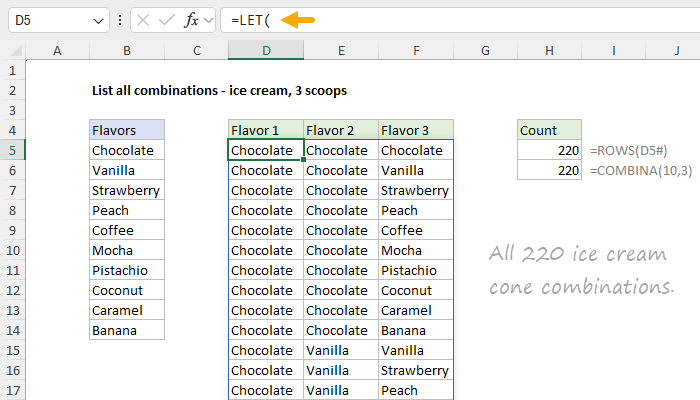
But how can we actually see the flavor combinations?
Excel's built-in functions won't help you there, but it is possible to build your own formula that will generate a list of all 220 combinations, as seen in the workbook below. The formula in D5 looks like this:
=LET(
list,B5:B14,
n,ROWS(list),
k,3,
counter,SEQUENCE(n^k,,0),
powers,SEQUENCE(,k,k-1,-1),
picks,MOD(INT(counter/n^powers),n)+1,
keep,BYROW(picks,LAMBDA(tuple,AND(DROP(tuple,,1)>=DROP(tuple,,-1)))),
FILTER(INDEX(list,picks),keep)
)
[ Download the workbook and read the full explanation]
This is an advanced formula with some clever tricks. If the flavors change, the formula will instantly list new combinations. On Sheet2, I show how to use the same approach to list pizza combinations, where a combination = 3 toppings with no repeats. The formulas only differ by one character. The article above explains the formulas in detail. Download the workbook to try it out yourself and follow along.
Note: This example requires Excel 2024 or Excel 365.
Excel formulas
We maintain a list of over 1000 working formulas here.
If you need more structure, we also offer video training.
Have a great weekend!
Dave
The Exceljet newsletter is free and sent weekly on Fridays. Each week, I take a detailed look at a specific Excel formula or function. Sign up on our home page. |
|
|
|
|
|
|
|
Exceljet
P.O. Box 4804
Salt Lake City, UT 84110
Copyright © 2026 Exceljet, All rights reserved.
You received this email because you are subscribed to our newsletter.
To unsubscribe, click the link below.
|
|
|
|
|
