Hi - Dave here.
Happy Friday!
I had a question from a reader this week about converting a UTC timestamp like "2026-01-18T20:19:42Z" to Pacific Standard Time (PST).
UTC timestamps are a common standard for dates with times, but Excel won't correctly recognize this format without some help. If you try to apply date formatting to a UTC timestamp, nothing happens.
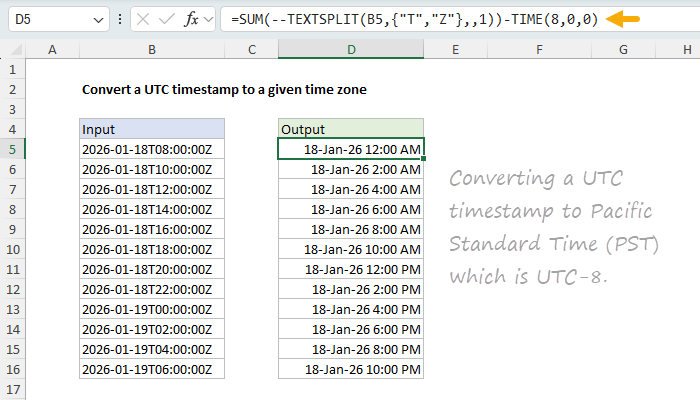
This is an interesting problem that touches on several important topics in Excel. One formula I came up with uses the TEXTSPLIT function. You can see how it works in the screenshot below, where the formula in cell D5 is:
=SUM(--TEXTSPLIT(B5,{"T","Z"},,1)) - TIME(8,0,0)
[
Download the workbook and read the full explanation]
This formula uses TEXTSPLIT with two delimiters, "T" and "Z", provided as an array constant. Once we have the date and time values, we use the double negative (--) trick to convert them to numbers, then sum the results. Finally, we subtract 8 hours with the TIME function to convert from UTC to PST. Download the workbook and read the full explanation at the link above, and try it out yourself.
Note: TEXTSPLIT requires a current version of Excel. In the workbook above, I also show how to solve the problem with the SUBSTITUTE function, which works in all versions of Excel. The workbook contains both formulas.
Excel formulas
We maintain a list of over 1000 working formulas
here.
If you need more structure, we also offer
video training.
Have a great weekend!
Dave
The Exceljet newsletter is free and sent weekly on Fridays. Each week, I take a detailed look at a specific Excel formula or function. Sign up on our home page.