Hi - Dave here.
Happy Friday!
Here's a fun one. You walk into an ice cream shop with 10 flavors and order a 3-scoop cone. You can repeat flavors if you like (three scoops of chocolate is fine), but the order of the scoops doesn't matter. How many different combinations are possible?
The answer is 220, and in Excel you can calculate it with the COMBINA function like this:
=COMBINA(10,3) // returns 220
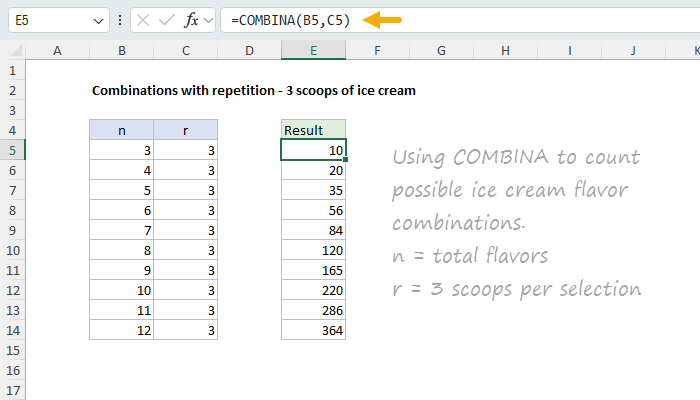
You can see an example of COMBINA in the worksheet below, which shows how the number of combinations grows as the number of flavors increases (with 3 scoops).
[
Download the workbook and read the full explanation]
But how do you know to use COMBINA and not COMBIN, PERMUT, or PERMUTATIONA? That's the tricky part. Excel has several functions for counting possibilities, and choosing the right one comes down to just two questions:
1. Does order matter?
2. Can items repeat?
In this week's article, I explain the difference between a combination and a permutation in plain English, then walk through some everyday examples: committees, race medals, PIN codes, pizza toppings, and lottery tickets. Along the way we look at 5 different Excel functions: FACT, COMBIN, COMBINA, PERMUT, and PERMUTATIONA. Click the link above to read the article and download the workbook to follow along.
Excel formulas
We maintain a list of over 1000 working formulas
here.
If you need more structure, we also offer
video training.
Have a great weekend!
Dave
The Exceljet newsletter is free and sent weekly on Fridays. Each week, I take a detailed look at a specific Excel formula or function. Sign up on our home page.