Hi - Dave here.
Happy Friday!
What is the MAP function for?
The easiest way to think about MAP is this: write a formula for one cell, and MAP runs it on every cell in a given range.
But Excel already does this, so why do we need MAP?
Usually it's to make a formula spill that won't spill on its own.
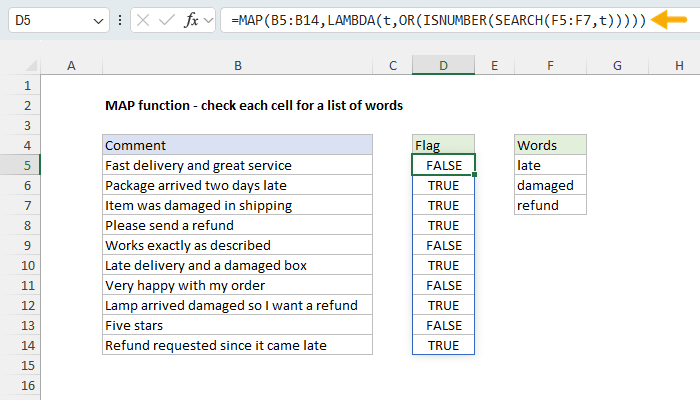
For example, in the worksheet below, the goal is to flag the comments that mention any of the words in F5:F7. The formula to test one comment is simple:
| =OR(ISNUMBER(SEARCH(F5:F7,B5))) |
But this formula won't spill if we replace B5 with B5:B14. OR returns a single result, and SEARCH pairs the two ranges instead of testing for every word. MAP solves this problem by running the word search one comment at a time. The formula in D5 is:
| =MAP(B5:B14,LAMBDA(t,OR(ISNUMBER(SEARCH(F5:F7,t))))) |
Download the workbook and read the full explanation
To help you understand how you can use MAP, I just updated our page with eight worked examples, including the one above. I cover the reasons a formula won't spill on its own, running counts, and counting only the visible rows in a filtered list. I also include a clever way to turn a seating chart of names into a seating chart of initials with one formula. Click the link above to see all the examples. Then download the workbook and try it out yourself.
Note: MAP requires Excel 2024 or Excel 365.
Support Exceljet
Many websites (including Exceljet) have lost over half their traffic in the past year because of the crushing impact of AI on web searches. Exceljet is still at it, publishing new content each week. If you find Exceljet helpful, you can support the site and go ad-free with the Exceljet Lifetime Pass. One payment, no subscription, and ads are gone forever. Plus, you get our Excel Shortcuts video course, free.
Excel formulas
We maintain a list of over 1000 working formulas here.
If you need more structure, we also offer video training.
Have a great weekend!
Dave
The Exceljet newsletter is free and sent weekly on Fridays. Each week, I take a detailed look at a specific Excel formula or function. Sign up on our home page.

Exceljet
P.O. Box 4804
Salt Lake City, UT 84110
Copyright © 2026 Exceljet, All rights reserved.
You received this email because you are subscribed to our newsletter.
To unsubscribe, click the link below.