Hi - Dave here.
In my last email, I shared a formula to randomly select 10 names from a larger group of 100 names. The formula works well. However, because it is built using the volatile RANDARRAY function, it will generate new results every time
any change is made to the workbook.
How can we avoid that problem? Well, the classic workaround is to copy the formula output, then use Paste Special > Values to create static values that won't change. However, this is a manual process that takes several steps. Worse, it destroys the formulas used to create random values to start with.
Isn't there a better way? As a matter of fact, there is. With the new LAMBDA function and other powerful new functions in Excel, we can build a random number generator that generates random numbers using a seed value.
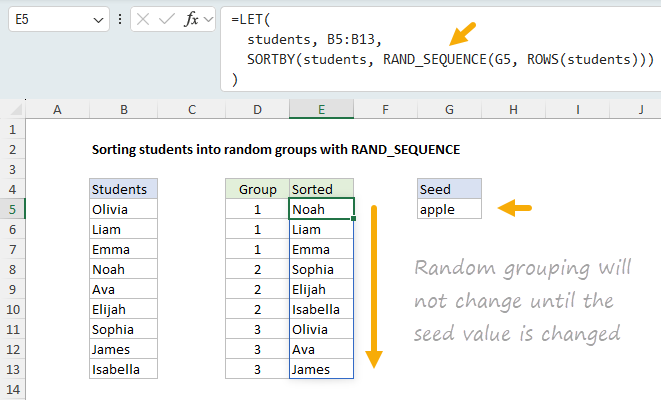
You can see the result below, where the formula in cell E5 sorts students into random groups using a custom lambda function called RAND_SEQUENCE, and the seed value "apple" in cell G5.
[
Download the workbook and read the full explanation]
The beauty of this approach is that the random grouping will not change until you provide a new seed value. Even better, you can "roll back" to the original random grouping anytime you want by using "apple" again as the seed value. In short, a seeded Random Number Generator is useful in Excel because it gives you "reproducible randomness", something Excel's built-in random functions cannot provide. The article provides a full explanation. Download the workbook and try it out for yourself.
Note: This example requires Excel 365 or Excel 2024.
Log in and enjoy an ad-free Exceljet
We run ads to support our site, but I know they can be annoying and distracting. Enjoy a clean, ad-free experience and support our work with an
Exceljet Lifetime Pass. Just log in, and ads disappear forever.
Exceljet Chatbot updated
We've updated our
free chatbot to be even better. You can ask the bot questions about Excel any time you want. It never sleeps and never gets tired.
Excel formulas
We maintain a list of over 1000 working formulas
here.
If you need more structure, we also offer
video training.
Have a great week!
For those of you in the United States, Happy Thanksgiving!
Dave
The Exceljet newsletter is free and sent weekly. Each week, I take a detailed look at a specific Excel formula or function. Sign up on our home page.