Hi - Dave here.
Happy Friday!
Here's a problem that comes up often: you need to collect values like product codes, usernames, or IDs, and the values must contain only letters and numbers. No spaces, no punctuation, no symbols. Excel's data validation has no built-in rule for this, so you need a custom formula. But what?
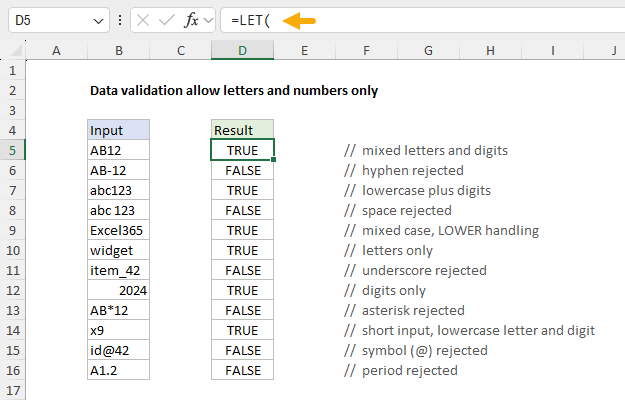
Last week, I shared the updated LET function page. This week, you can see LET in action on a new page that solves this problem directly. In the worksheet below, the data validation rule applied to B5:B16 is based on this formula:
=LET(
input,B5,
allowed,"abcdefghijklmnopqrstuvwxyz0123456789",
chars,MID(LOWER(input),SEQUENCE(LEN(input)),1),
result,AND(ISNUMBER(FIND(chars,allowed))),
result
)
The formula splits each entry into individual characters, then checks that every character appears in the allowed list. If any character fails, the input is rejected. To make the logic easy to understand and test, the same formula is entered in column D, where it shows a TRUE or FALSE result for each input in column B.
[
Download the workbook and read the full explanation]
A few interesting details:
The formula uses FIND instead of SEARCH on purpose. SEARCH seems friendlier (it ignores case), but SEARCH supports wildcards, which causes trouble.
To change what characters are allowed, you only edit the "allowed" string. If you need to allow spaces and hyphens just add them to the string.
If you're on Excel 365, the REGEXTEST function makes it a one-liner:
=REGEXTEST(B5,"^[a-zA-Z0-9]+$")
Finally, working through this example prompted me to add a new section to the LET page: a step-by-step process for converting an existing formula to LET, along with my thoughts on LET best practices. I say "best practices", but LET is new enough that best practices don't really exist yet :) You can find the
updated page here.
Note: The LET formula requires Excel 2021 or later. The page also includes an option that works in older versions of Excel.
Excel formulas
We maintain a list of over 1000 working formulas
here.
If you need more structure, we also offer
video training.
Have a great weekend!
Dave
The Exceljet newsletter is free and sent weekly on Fridays. Each week, I take a detailed look at a specific Excel formula or function. Sign up on our home page.