Hi - Dave here.
Happy Friday!
What is Excel's MAKEARRAY function for?
Briefly, MAKEARRAY creates a grid of values using a formula you provide. In other words, it's a one-formula solution for a formula you would otherwise have to copy across and down.
Honestly, it's a hard function to understand until you "get it." MAKEARRAY doesn't start with data; it starts with the size of the final array. Then it "walks" the grid, keeping track of the current row and column, and generating values with the logic you supply.
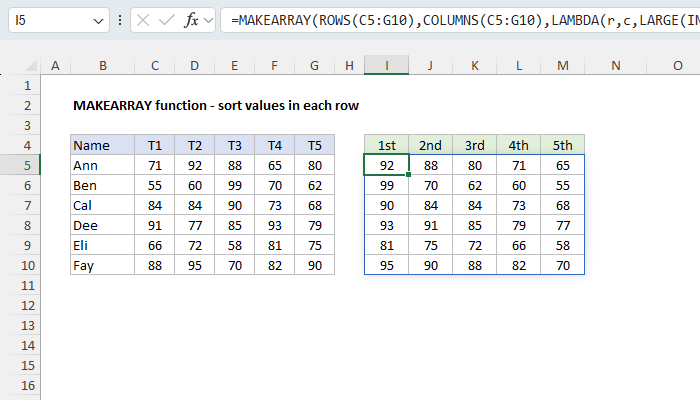
One example is sorting the values in each row. It sounds simple, but the SORT function can't sort each row separately. In the worksheet below, the goal is to sort each person's test scores from high to low. MAKEARRAY can do it with a single formula in cell I5:
| =MAKEARRAY(ROWS(C5:G10),COLUMNS(C5:G10),LAMBDA(r,c,LARGE(INDEX(C5:G10,r,0),c))) |
Download the workbook and read the full explanation
MAKEARRAY returns the entire grid in one step. At each position, it asks LARGE for the nth largest score in row r, where n is c.
MAKEARRAY has been pretty much neglected on Exceljet, and I've finally updated the page with eight new examples, simple to advanced, including a running total in each row and even a correlation matrix with one formula. See the article for details, then download the workbook to try it out yourself.
Do you have a good example of MAKEARRAY in the real world? Hit reply and let me know. I'm always interested in improving the page.
Note: MAKEARRAY requires Excel 2024 or Excel 365.
Support Exceljet
Exceljet has lost over half its traffic in the past year as AI changes how people search the web. But we're still here, publishing new content every week. If you find Exceljet helpful, you can support the site and go ad-free with the Exceljet Lifetime Pass. One payment, no subscription, and ads are gone forever. Plus, you get our Excel Shortcuts video course, free.
Excel formulas
We maintain a list of over 1000 working formulas here.
If you need more structure, we also offer video training.
Have a great weekend!
Dave
The Exceljet newsletter is free and sent weekly on Fridays. Each week, I take a detailed look at a specific Excel formula or function. Sign up on our home page.

Exceljet
P.O. Box 4804
Salt Lake City, UT 84110
Copyright © 2026 Exceljet, All rights reserved.
You received this email because you are subscribed to our newsletter.
To unsubscribe, click the link below.