|
Hi - Dave here.
Happy Friday!
When you have a big table with hundreds or thousands of rows, how can you easily see the most recent data without scrolling to the bottom?
Examples of this kind of data include things like:
- Recent deposits or expenses
- Recent transactions
- Recent stock prices
- Recent orders
- Recent invoices
The main challenge is that you don't know where the table ends, so the formula needs to work this out. This is an interesting problem, and it's a great use case for the TAKE function.
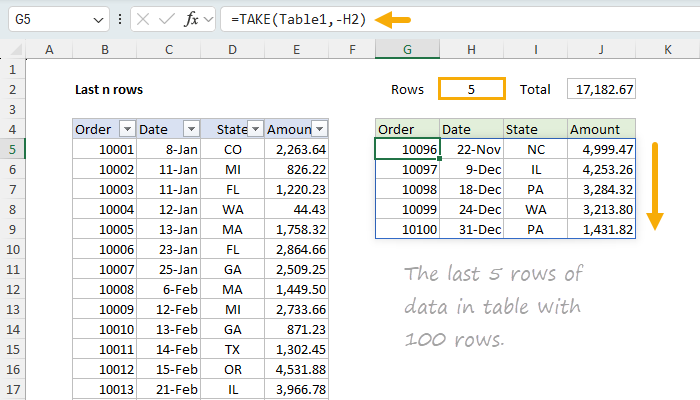
In the worksheet below, the goal is to display the last n rows of a table or range, where n is a variable in H2 that can be easily changed.
The formula in cell G5 is simple, and looks like this:
=TAKE(Table1,-H2)
[ Download the workbook and read the full explanation]
This formula is fully dynamic and will update automatically as the number of rows in the table changes, or when the number of rows to retrieve in H2 is changed. You can use this approach whenever you want to see the most recent data in the table without scrolling. Although the example shows both the table and the formula on the same sheet, they could be on different sheets. The worksheet also includes a formula that will conditionally sort the extracted rows using a checkbox. Read the article above for details, then download the worksheet and try it out for yourself.
Note: TAKE is only available in Excel 2024 or Excel 365. However, I've included a multi-cell array formula solution on Sheet3 that will work in older versions of Excel.
Excel formulas
We maintain a list of over 1000 working formulas here.
If you need more structure, we also offer video training.
Have a great weekend!
Dave
The Exceljet newsletter is free and sent weekly on Fridays. Each week, I take a detailed look at a specific Excel formula or function. Sign up on our home page.
|
