Hi - Dave here.
Happy Friday!
The great thing about UNIQUE is that it
just works.
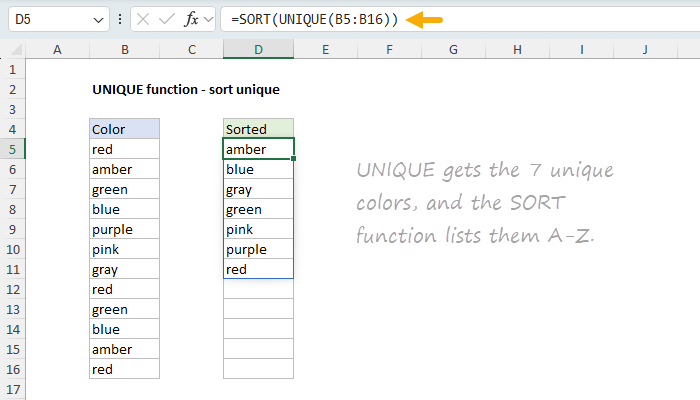
You can see an example below, where the formula in D5 is:
=SORT(UNIQUE(B5:B16))
UNIQUE gets the 7 unique colors, and SORT lists them A-Z. Done.
[
Download the workbook and read the full explanation]
I've just updated our UNIQUE function page with 10 practical examples, including filtering blanks, extracting unique rows, counting uniques, and more. Click above to see them all. Then download the workbook and try them out yourself!
Note: The UNIQUE function is only available in Excel 2021 or later.
Tax bracket worksheet updated
Just a reminder that I've updated our
Income tax worksheet with U.S. tax rates for 2025. This is an interesting worksheet with several advanced formulas.
Excel formulas
We maintain a list of over 1000 working formulas
here.
If you need more structure, we also offer
video training.
Have a great weekend!
Dave
The Exceljet newsletter is free and sent weekly on Fridays. Each week, I take a detailed look at a specific Excel formula or function. Sign up on our home page.