Hi - Dave here.
Happy Friday!
You probably know that I like short formulas 🙂
That's because a well-designed formula is often short and elegant.
However, in the past few weeks, I worked on what became my longest Excel formula ever, around 80 lines of code.
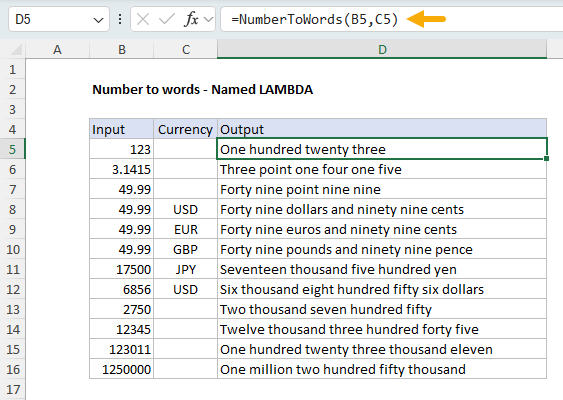
The formula is long because it does something complex – it converts numbers into words, with or without currency. But, because it's saved as a named LAMBDA, you can call it like any other Excel function:
=NumberToWords(10.99) // Ten point nine nine
=NumberToWords(10.99,"USD") // Ten dollars and ninety nine cents
[
Download the workbook and read the full explanation]
I wrote this formula because I wanted to see what it was like to solve a difficult problem with Excel's dynamic array functions. Although it took me longer than expected, the result is a formula that's complex enough to handle real-world requirements, but organized in a way that's understandable and maintainable. Excel's formula engine has come a long way these past few years!
Click the link above to see the full source code, then download the workbook and try it out yourself.
Note: This formula requires Excel 365 or Excel 2021+.
Excel formulas
We maintain a list of over 1000 working formulas
here.
If you need more structure, we also offer
video training.
Have a great weekend, and all the best in the new year!
Dave
The Exceljet newsletter is free and sent weekly on Fridays. Each week, I take a detailed look at a specific Excel formula or function. Sign up on our home page.