Hi - Dave here.
Happy Friday!
Last week, I shared a formula to search a movie database with three optional inputs: year, director, and actor. The formula I used looks like this:
=LET(
all,SEQUENCE(ROWS(movies))^0,
year,IF(C2="",all,movies[Year]=C2),
director,IF(D2="",all,ISNUMBER(SEARCH(D2,movies[Director]))),
actor,IF(E2="",all,ISNUMBER(SEARCH(E2,movies[Cast]))),
FILTER(movies,year*director*actor,"No match")
)
After the email went out, I got a great reply from Matt Hanchett, a reader and Excel formula wiz, who suggested this more compact version:
=LET(
year,(C2="")+(movies[Year]=C2),
director,ISNUMBER(SEARCH(D2,movies[Director])),
actor,ISNUMBER(SEARCH(E2,movies[Cast])),
FILTER(movies,year*director*actor,"No match")
)
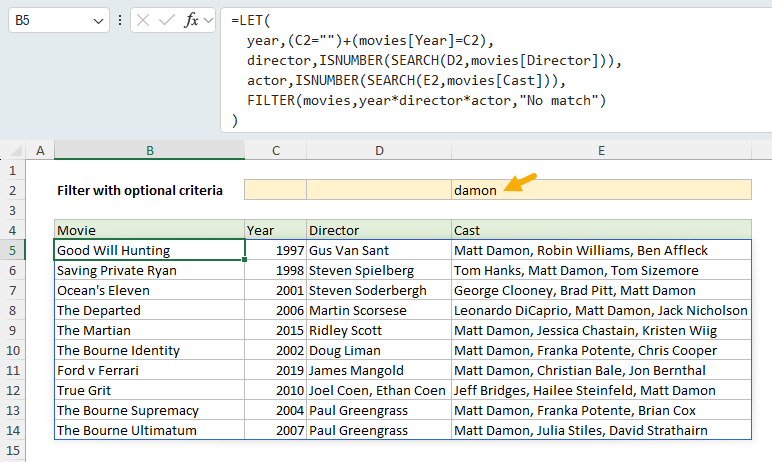
Notice the three IF functions are gone, along with the array of 1s created with SEQUENCE. The results are exactly the same, as you can see in the worksheet below, where "damon" has been entered as the actor and the formula returns 10 matching movies:
[
Read the full explanation on the updated page]
So how does this work? The clever part is the year test:
(C2="")+(movies[Year]=C2)
This is Boolean algebra, where addition works like OR: a movie passes the test when C2 is blank,
or when the year in C2 matches the movie's year. When C2 is blank, the test returns an array of all 1s, and FILTER ignores the year completely.
What about director and actor? This is interesting. It turns out that SEARCH has a quirk: when the text you are looking for is empty (""), SEARCH returns 1 instead of an error. That means the director and actor tests automatically match everything when their inputs are empty. No extra logic needed.
Can we shrink the formula even further? Yes. We could remove LET altogether and put everything directly into FILTER. But there is a subtle gotcha with this approach, related to the order of operations. See the new section on the page,
Making the formula more compact, for details.
Which version do you prefer? The original is longer, but easy to follow step by step. Matt's version is more compact and uses some clever tricks.
Note: The formulas above require Excel 2021 or later. The movie database is in an Excel Table that will work in any version of Excel.
Excel formulas
We maintain a list of over 1000 working formulas
here.
If you need more structure, we also offer
video training.
Have a great weekend!
Dave
The Exceljet newsletter is free and sent weekly on Fridays. Each week, I take a detailed look at a specific Excel formula or function. Sign up on our home page.