Hi - Dave here.
Happy Friday!
XLOOKUP is the single most powerful and flexible lookup function in Excel.
If you use Excel often, this is one function you should understand.
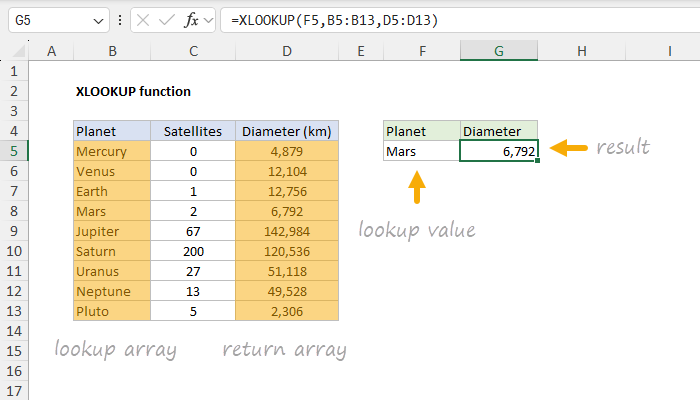
The beauty of XLOOKUP is that it "decouples" the lookup array from the return array. In plain English, you can use
one range to look up values and
another range to return values. You can see XLOOKUP in action below, where the formula in G5 is:
=XLOOKUP(F5,B5:B13,D5:D13)
[
Download the workbook and read the full explanation]
I recently updated our main XLOOKUP page to include 10 examples, plus the Excel workbook that you can download and play with. These examples include simple match problems, as well as advanced problems that require multiple criteria. For especially tricky lookups, I even included an example of how to use regular expressions (regex) with XLOOKUP. The article above walks you through each example in turn. Download the workbook and follow along.
Note: This example requires Excel 2021+ or Excel 365.
Excel formulas
We maintain a list of over 1000 working formulas
here.
If you need more structure, we also offer
video training.
Have a great weekend!
Dave
The Exceljet newsletter is free and sent weekly on Fridays. Each week, I take a detailed look at a specific Excel formula or function. Sign up on our home page.