Hi - Dave here.
Happy Friday!
Hope you are doing well this holiday season!
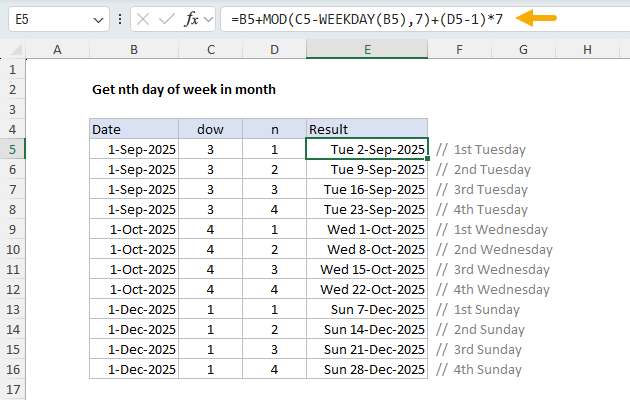
I have been working on too many things at once. But I did want to share a formula I reworked this past week, where the goal is to get the "nth day of week" in a month…the 2nd Tuesday, the 3rd Friday, the first Wednesday, etc.
You can see how this works in the worksheet below. The target day of week (dow) comes from column C and is a number between 1-7, where days start on Sunday and end on Saturday. The value for n appears in column D. The formula in E5 looks like this:
=B5+MOD(C5-WEEKDAY(B5),7)+(D5-1)*7
[
Download the workbook and read the full explanation]
This is a tricky formula to understand, and I think it is a good example of how the LET function can make a formula easier to follow. Here is a version revised to use LET with named variables:
=LET(
date, B5,
dow, C5,
n, D5,
offset, MOD(dow-WEEKDAY(date),7),
date + offset + (n-1)*7
)
Yes, the formula is still tricky! But I think the names really help. Plus, it is much easier to extend a formula defined with LET. The article above has a full explanation and two more LET options that add more features to the original formula. Download the workbook and try it out yourself.
Note: the original formula above will work in any version of Excel. The LET function requires Excel 2021 or later.
Ad-free pass
Support our work and enjoy a clean, ad-free experience with an
Exceljet Lifetime Pass. Just log in, and ads disappear forever.
Excel formulas
We maintain a list of over 1000 working formulas
here.
If you need more structure, we also offer
video training.
Have a great weekend!
Dave
The Exceljet newsletter is free and sent weekly on Fridays. Each week, I take a detailed look at a specific Excel formula or function. Sign up on our home page.