Hi - Dave here.
Happy Friday!
This week, I published a new article on arrays in Excel. This used to be an advanced topic that only power users worried about, but with the introduction of dynamic arrays, they're now a key part of how Excel formulas work. If you use formulas often, arrays are something you really need to understand.
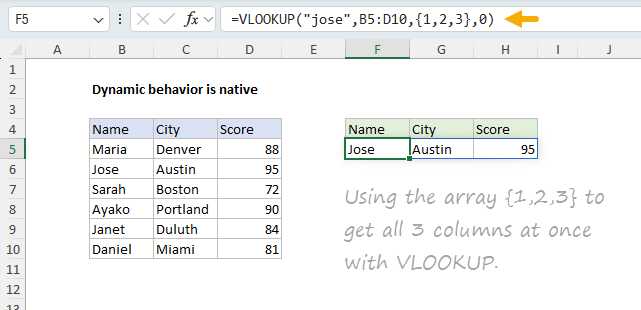
The article covers the basics (what arrays are, how array formulas work, what dynamic arrays are) and then walks through practical examples using SORT, FILTER, UNIQUE, VSTACK, and other newer functions. But arrays also work in older functions. For example, here's a formula that asks VLOOKUP for three columns at once:
=VLOOKUP("jose",B5:D10,{1,2,3},0)
[
Download the workbook and read the full explanation]
Yes, you can get multiple results with VLOOKUP :) The trick is the array constant {1,2,3}. The article explains how to easily "see" this array in Excel with F9, and the newer select-to-preview feature. It also includes a function reference section. Download the attached workbook to follow along and try it out yourself.
Excel formulas
We maintain a list of over 1000 working formulas
here.
If you need more structure, we also offer
video training. For dynamic arrays, check out
Dynamic Array Formulas.
Have a great weekend!
Dave
The Exceljet newsletter is free and sent weekly on Fridays. Each week, I take a detailed look at a specific Excel formula or function. Sign up on our home page.