Hi - Dave here.
Happy Friday!
What is the LAMBDA function?
The LAMBDA function lets you turn any formula into a custom function, with a name you choose, without VBA or macros. Once the function is named, you can use it anywhere in the workbook just like other built-in functions. And if you need to fix a problem, you do it in just one place.
The approach to converting a formula to a LAMBDA is simple: replace the cell references in a formula with names (parameters), and wrap the result in LAMBDA. For example, this formula multiplies two numbers:
| =B5*C5 |
Here is the same formula as a LAMBDA, with x and y standing in for the cells:
| =LAMBDA(x,y,x*y) |
Once you give it a name like "Multiply" in the Name Manager, you can write =Multiply(B5,C5). There is no need for a function like this in Excel, but you get the idea.
For a more realistic example, consider a formula that converts inches to feet and inches, where 70 inches becomes 5' 10". The best formula I have uses LET, handles rounding and negative numbers, and runs eight lines:
| =LET( input,B5, n,ROUND(ABS(input),0), sign,IF(input<0,"-",""), feet,INT(n/12), inches,MOD(n,12), sign&feet&"' "&inches&"""" ) |
You can convert this into a custom LAMBDA in one step: remove the line that names the input cell, and make that name a parameter:
| =LAMBDA(input, LET( n,ROUND(ABS(input),0), sign,IF(input<0,"-",""), feet,INT(n/12), inches,MOD(n,12), sign&feet&"' "&inches&"""" ) ) |
After naming the LAMBDA "InchesToFeet" in the Name Manager, you can use it like this:
| =InchesToFeet(B5) |
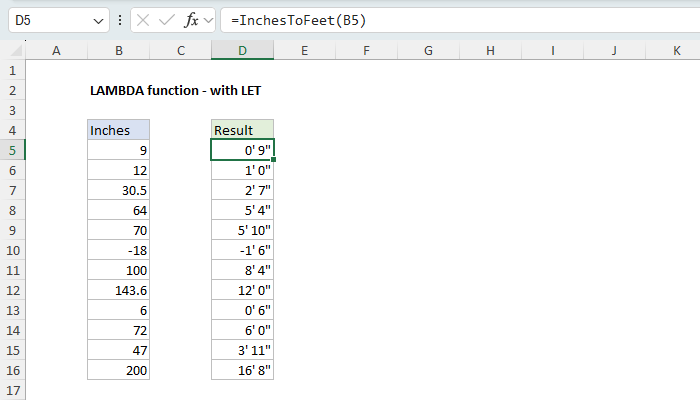
Download the workbook and read the full explanation
The eight-line formula is now a function. Anyone can use it without understanding how the code works, and if the logic ever needs to change, there is one place to change it.
The LAMBDA function is powerful, but it can be hard to understand. To help you get started, I updated our LAMBDA page this week with a lot more examples. The page walks through creating a custom function step by step, then covers LAMBDA with LET, LAMBDA inside functions like MAP and BYROW, optional arguments, recursion, and the naming rules that trip people up. Download the companion workbook and try it out yourself.
Note: LAMBDA requires Excel 2024 or Excel 365.
Keeping Exceljet going
The internet as we know it is getting crushed by AI. Many websites have lost over 50% of their traffic. Exceljet is still at it, publishing new content each week. If you find Exceljet helpful, you can support the site and go ad-free with the Exceljet Lifetime Pass. One payment, no subscription, and ads are gone forever.
Excel formulas
We maintain a list of over 1000 working formulas here.
If you need more structure, we also offer video training.
Have a great weekend!
Dave
The Exceljet newsletter is free and sent weekly on Fridays. Each week, I take a detailed look at a specific Excel formula or function. Sign up on our home page.

Exceljet
P.O. Box 4804
Salt Lake City, UT 84110
Copyright © 2026 Exceljet, All rights reserved.
You received this email because you are subscribed to our newsletter.
To unsubscribe, click the link below.