Hi - Dave here.
Happy Friday!
This week I had a good question from a reader named Clive: how to set up a worksheet to find plays by actor, when the actors appear in a comma-separated list?
To demonstrate one approach, I created a small database of 500 well-known movies, with a column for Year, Director, and Cast.
My goal was a simple search form that lets you search movies by year, director, or actor, and see results immediately. The catch is that each input needs to be
optional. If you leave an input empty, it should be ignored. For example, if you enter "damon" for actor, and leave year and director blank, you should see all movies with Matt Damon. If all search inputs are empty, we should see all 500 movies.
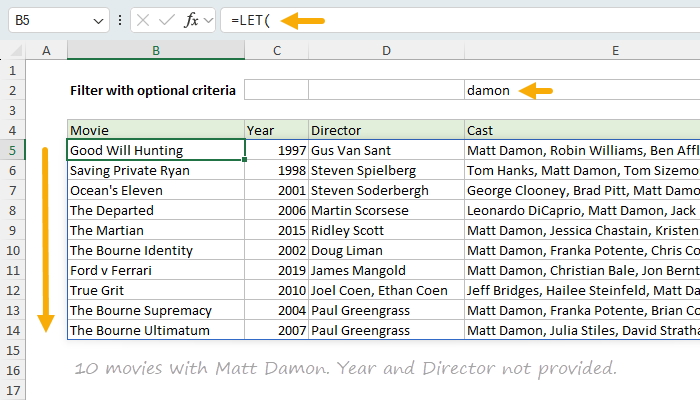
You can see how this works in the worksheet below, where "damon" has been entered as the actor, and the formula in cell B5 returns 10 matching movies:
=LET(
all,SEQUENCE(ROWS(movies))^0,
year,IF(C2="",all,movies[Year]=C2),
director,IF(D2="",all,ISNUMBER(SEARCH(D2,movies[Director]))),
actor,IF(E2="",all,ISNUMBER(SEARCH(E2,movies[Cast]))),
FILTER(movies,year*director*actor,"No match")
)
[
Download the workbook and read the full explanation]
The core of this approach is the FILTER function, an excellent tool for extracting matching records based on criteria. But it's an interesting problem to make each condition optional. In the end, I decided to use SEQUENCE to create an array of 1s that stand in for a search input when it is empty. See the article for details.
One design question worth thinking about: should an empty search form show all records, or none? In this example, empty means "show everything", but it would make sense to hide results in other situations.
Note: The main formula requires Excel 2021 or later. The dropdown list helper formulas use newer functions like GROUPBY that require Excel 365. The movie database is in an Excel Table that will work in older versions of Excel.
Excel formulas
We maintain a list of over 1000 working formulas
here.
If you need more structure, we also offer
video training.
Have a great weekend!
Dave
The Exceljet newsletter is free and sent weekly on Fridays. Each week, I take a detailed look at a specific Excel formula or function. Sign up on our home page.