Hi - Dave here.
Happy Friday!
Of all Excel's many functions, DATEDIF is the most mysterious.
DATEDIF calculates the interval between two dates in years, months, and days. It's a genuinely useful function. You can see an example of how it works below:
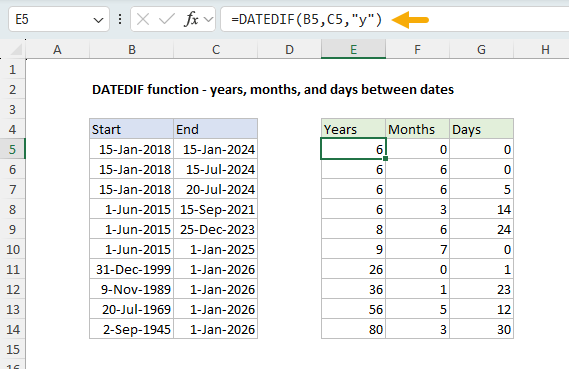
[
Download the workbook and read the full explanation]
Yet, Excel won't help you enter DATEDIF, and it won't autocomplete when you type. Even stranger, Microsoft's own documentation includes this warning:
Excel provides the DATEDIF function in order to support older workbooks from Lotus 1-2-3. The DATEDIF function may calculate incorrect results under certain scenarios.
Hmm… a function that "may" calculate incorrect results? That's not very encouraging! What should we make of this? Recently, I did some testing to find out.
What I found is that DATEDIF works fine in most situations, but there are some edge cases to watch out for. Click above for the full explanation and download the workbook to follow along.
Note: DATEDIF is available in all versions of Excel.
Excel formulas
We maintain a list of over 1000 working formulas
here.
If you need more structure, we also offer
video training.
Have a great weekend!
Dave
The Exceljet newsletter is free and sent weekly on Fridays. Each week, I take a detailed look at a specific Excel formula or function. Sign up on our home page.