Hi - Dave here.
Happy Friday!
Have you ever built a "nested if" formula? A classic example is a nested if formula to assign grades:
| =IF(C5<60,"F",IF(C5<70,"D",IF(C5<80,"C",IF(C5<90,"B","A")))) |
Note that each IF function is carefully nested inside another, and parentheses are matched in a particular way. Nested IFs work great in Excel, but they can be a pain to write, test, and read.
The IFS function was added to Excel to make this operation much simpler. Instead of nesting, you give IFS a flat list of test/value pairs, and it returns the value for the first test that comes back TRUE. Here is the formula above, rewritten with the IFS function:
| =IFS(C5<60,"F",C5<70,"D",C5<80,"C",C5<90,"B",C5>=90,"A") |
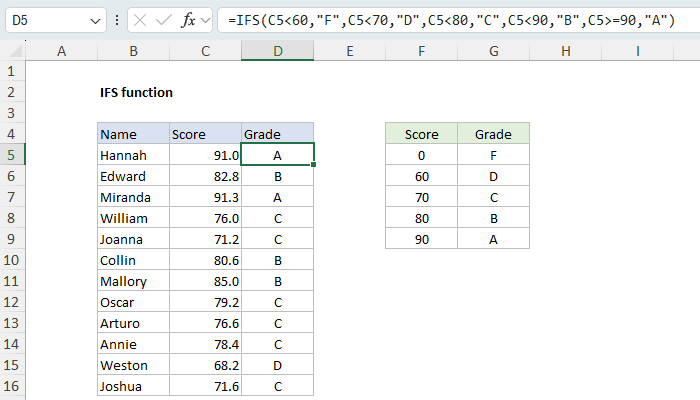
Download the workbook and read the full explanation
The tests run in order and the first TRUE result "wins", so the order you list conditions in is the whole trick. Both formulas return the same grades, but one of them is a lot easier to read and write.
I've updated our IFS page this week with six worked examples, including a couple of things that trip people up. The big one: IFS has no built-in default value. If no test returns TRUE, IFS returns #N/A. The fix is to add TRUE as a final test.
The page also shows how to use IFS with AND and OR, how IFS works with arrays, and explains when you might be better off skipping IFS altogether and using a lookup table with XLOOKUP instead. See the article for details and the workbook that you can download and try out yourself.
Note: IFS requires Excel 2019 or later.
Excel formulas
We maintain a list of over 1000 working formulas here.
If you need more structure, we also offer video training.
Have a great weekend!
Dave
The Exceljet newsletter is free and sent weekly on Fridays. Each week, I take a detailed look at a specific Excel formula or function. Sign up on our home page.

Exceljet
P.O. Box 4804
Salt Lake City, UT 84110
Copyright © 2026 Exceljet, All rights reserved.
You received this email because you are subscribed to our newsletter.
To unsubscribe, click the link below.